
Download Aivia – AI‑Powered Team Productivity Platform
Overview
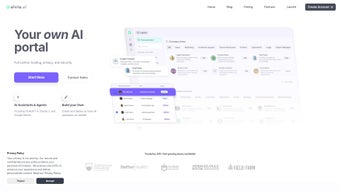
Aivia AI for Business is a next‑generation, cloud‑native platform that brings the power of large‑language models straight into everyday teamwork. Designed with both security and ease‑of‑use in mind, Aivia lets every employee—from marketers crafting campaign copy to finance analysts preparing quarterly forecasts—leverage AI without writing a single line of code. The core idea is simple: ingest your existing documents, spreadsheets, or knowledge bases, then train a custom AI assistant that answers questions, drafts content, and automates repetitive cognitive tasks.
Aivia ships with two of the industry’s most advanced models—OpenAI’s ChatGPT‑4 and Google Gemini—so you can choose the engine that best fits a particular use case, whether it’s creative brainstorming or data‑driven insight generation. In addition to custom assistants, the platform offers a library of more than 2,500 ready‑to‑use prompts and a suite of pre‑built Specialist Assistants covering marketing, sales, finance, operations, and engineering. Security is baked in at every layer: end‑to‑end TLS 1.3 encryption, AES‑256 data‑at‑rest protection, granular role‑based access controls, and detailed audit logs keep sensitive corporate information safe and compliant with GDPR, CCPA, and HIPAA.
Pricing follows a transparent, seat‑based subscription model, and a 14‑day free trial with full feature access removes any financial barrier to testing. Whether you’re a lean startup seeking rapid scaling or a multinational enterprise modernizing legacy workflows, Aivia positions itself as the all‑in‑one hub where AI meets collaboration, turning raw data into actionable intelligence across the organization.
Key Features & Benefits
- Multi‑Model Support: Switch seamlessly between ChatGPT‑4 and Google Gemini from a single dashboard.
- No‑Code Assistant Builder: Drag‑and‑drop interface to train AI assistants using PDFs, CSVs, or cloud storage.
- Specialist Assistants: Pre‑configured bots for marketing, sales, finance, operations, and engineering.
- 2,500+ Prompt Library: Curated prompts that accelerate content creation, data analysis, and decision‑making.
- Team Collaboration Tools: Shared workspaces, real‑time co‑authoring, and threaded comments.
- Enterprise‑Grade Security: AES‑256 encryption, TLS 1.3 transport security, RBAC, and audit logging.
- Scalable Cloud Architecture: Auto‑scaling resources that grow with your user base.
- Analytics Dashboard: Track token usage, cost, and productivity metrics per team.
- 14‑Day Free Trial: Full access with no credit‑card required.
- Transparent Subscription: Tiered pricing based on seat count and compute consumption.
Why These Features Matter for Your Business
The ability to toggle between two of the most powerful LLMs means you can match the right model to the right task—ChatGPT‑4 excels at creative generation, while Gemini shines in structured data analysis. Because the Assistant Builder requires no programming, business users can launch a brand‑voice bot in minutes, dramatically shortening time‑to‑value and reducing dependence on scarce data‑science resources. Specialist Assistants act as instant domain experts, cutting down the time spent searching internal wikis or consulting external consultants.
The extensive prompt library provides a proven starting point for new users, while power users can customize prompts to fit niche workflows, ensuring the platform scales with skill level. Collaboration tools embed AI directly into the team’s daily workflow, turning a solitary chatbot into a shared teammate that contributes to documents, presentations, and reports in real time. Security features satisfy the strictest compliance regimes, giving CIOs confidence that sensitive data never leaves the organization unprotected.
Finally, the analytics dashboard turns usage data into a clear ROI narrative, allowing finance leaders to justify AI spend and executives to track productivity gains across departments.
Installation, Usage & Compatibility
Step‑by‑Step Onboarding
- Create Your Account: Visit Aivia’s website, register with a business email, and confirm the activation link.
- Activate the Free Trial: Select the 14‑day trial; no credit‑card is required.
- Invite Team Members: From the admin console, add users by email and assign roles (Admin, Manager, Contributor).
- Select an AI Model: In the “Models” tab, choose ChatGPT‑4 or Gemini and set optional usage caps.
- Upload Your Knowledge Base: Drag‑and‑drop PDFs, spreadsheets, or connect Google Drive/OneDrive to feed the assistant.
- Build a Custom Assistant: Name the bot, link the uploaded data, and pick a response style (formal, casual, technical).
- Leverage the Prompt Library: Browse the 2,500+ prompts, click “Add to Workspace,” and start generating output instantly.
- Collaborate in Real Time: Open a shared workspace, invite teammates, and watch AI suggestions appear as you type.
- Monitor Metrics: Use the analytics dashboard to view token consumption, cost per user, and productivity uplift.
- Upgrade or Cancel: At trial end, choose a subscription tier or cancel without penalty; data retention policies apply.
Supported Operating Systems & Devices
Aivia is a pure SaaS solution accessed through any modern web browser—Chrome, Edge, Firefox, or Safari—on Windows 10/11, macOS Monterey or later, and popular Linux distributions. The responsive UI also works on mobile devices running iOS 13+ or Android 9+. Because no native client is required, teams can switch between desktop, laptop, tablet, or smartphone without reinstalling software. For organizations that demand on‑premise deployment, Aivia offers a Docker‑based container that can be hosted behind corporate firewalls while retaining the same security standards and single‑sign‑on integrations (Okta, Azure AD, SAML). This hybrid option satisfies strict data‑residency requirements while preserving the cloud‑grade scalability of the core platform.
Security & Data Privacy Guarantees
Every interaction between the client and Aivia’s cloud is encrypted with TLS 1.3. Data stored at rest—documents, custom prompts, conversation logs—is secured using AES‑256 encryption. Role‑based access control (RBAC) enables administrators to define granular permissions for viewing, editing, or deleting assistants and associated data.
Detailed audit logs capture each user action, facilitating compliance reporting for GDPR, CCPA, HIPAA, and industry‑specific regulations. Regional data centers in North America, Europe, and Asia‑Pacific let you keep sensitive information within your jurisdiction. For the most sensitive workloads, the Docker on‑premise version runs the same encryption and RBAC mechanisms behind your own network perimeter, giving you full control over data residency while still benefiting from Aivia’s AI capabilities.
Pros, Cons, Frequently Asked Questions & Conclusion
Pros
- Intuitive no‑code interface makes AI accessible to non‑technical users.
- Dual‑model support (ChatGPT‑4 & Gemini) offers flexibility for varied tasks.
- Extensive 2,500+ prompt library accelerates onboarding and reduces learning curve.
- Specialist Assistants provide industry‑specific expertise out of the box.
- Enterprise‑grade security (AES‑256, TLS 1.3, RBAC, audit logs) meets strict compliance standards.
- Web‑based, cross‑platform access works on Windows, macOS, Linux, iOS, and Android.
- Transparent, seat‑based pricing with a risk‑free 14‑day trial.
- Analytics dashboard delivers clear ROI metrics for AI spend.
Cons
- Full functionality requires an internet connection; offline use is limited to the Docker on‑premise option.
- Advanced fine‑tuning or high‑volume token usage may necessitate higher‑tier subscriptions.
- Pricing can become significant for large teams with heavy AI consumption.
- Power users may miss deeper scripting or API‑level customization.
- Native integrations for some legacy ERP systems are still under development.
Can I train Aivia’s AI assistants with proprietary company data?
Yes. The no‑code Assistant Builder lets you upload PDFs, spreadsheets, or link cloud storage. Aivia indexes the content securely and uses it to generate context‑aware responses without exposing raw data to third parties.
Is there a limit to the number of users I can add during the free trial?
The 14‑day trial allows up to 10 users with full feature access. If you need more seats during evaluation, you can contact Aivia sales for a temporary extension.
How does Aivia ensure data privacy for regulated industries?
All data is encrypted at rest (AES‑256) and in transit (TLS 1.3). Role‑based access controls, audit logs, and regional data centers enable compliance with GDPR, CCPA, HIPAA, and other regulations. Enterprises can also deploy Aivia on‑premise via Docker to keep data behind their own firewalls.
Can I switch between ChatGPT‑4 and Google Gemini after I’ve trained an assistant?
Yes. Model selection is independent of the knowledge base, so you can reassign an existing assistant to a different underlying LLM at any time from the “Models” settings page.
What happens to my data after I cancel the subscription?
Aivia provides a 30‑day data retention window after cancellation. During this period you can export all documents, prompts, and conversation logs. After 30 days, the data is securely deleted from the platform’s servers.
Conclusion – Take the Next Step with Aivia
In a crowded market of niche AI tools, Aivia stands out as a comprehensive productivity hub that couples enterprise‑grade security with a flexible, model‑agnostic AI engine. Its no‑code approach democratizes AI across every department, while the built‑in analytics give leaders clear visibility into ROI. Although pricing can add up for large, high‑usage teams and offline capabilities are limited to the on‑premise Docker offering, the measurable productivity gains—tracked through the dashboard—often justify the investment. If you’re ready to streamline decision‑making, cut manual workload, and future‑proof your organization’s knowledge work, the 14‑day free trial provides a risk‑free way to experience Aivia firsthand. Download Aivia today, empower your team with intelligent assistants, and watch productivity soar.



.png)



